At A Glance: Are Streaming Sticks Worth the Hype?
Streaming sticks continue to dominate the home entertainment market in 2026. They offer a cost-effective way to access streaming content on older TVs, bringing smart features and app support that older sets lack.
However, not all streaming sticks are created equal. Performance and features vary widely, making it essential to choose based on your specific needs and budget. Whether you're watching Netflix or gaming, the right stick can make a big difference.
Verdict: Streaming sticks are still a smart investment for most users - but pick wisely.
Why You Should Trust Us
Ejiro Inspire has over 5 years of experience reviewing home entertainment tech. Our team tests devices in real-world environments with actual users, focusing on value, performance, and long-term usability.
We don't just review what’s available - we test how it performs in daily use. That means you get honest, actionable insights based on real-world usage rather than marketing fluff.
Understanding the Streaming Stick Market in 2026
The streaming stick market is saturated with options from major brands like Roku, Amazon Fire TV, and Google Chromecast. Newer models support 4K streaming, HDR, and advanced voice controls.
Budget options are more accessible than ever, but often lack premium features. For users who want the latest in streaming technology, a higher-end stick is worth the investment.
What Makes a Streaming Stick Great?
When evaluating streaming sticks, consider these key features:
- Streaming quality and speed: 4K resolution with HDR support is now standard.
- Ease of setup and use: A simple interface makes it easy for users to get started.
- App ecosystem and content availability: A wide range of apps ensures you don’t miss out on your favorite services.
- Voice assistant integration: Many modern sticks include Alexa, Google Assistant, or Siri.
- Build quality and design: A durable, well-designed stick will last longer and look good in any setup.
Top Picks: Best Streaming Sticks for 2026
Here are the our comprehensive comparison of the top Android streaming devices currently available in 2026, each suited to different user needs:
Roku Ultra 4K Streaming Stick

- Best for: Users who want a feature-rich, fast, and reliable streaming device.
- Supports: 4K HDR with Dolby Vision.
- Interface: Intuitive Roku interface with extensive app library.
The Roku Ultra 4K is the premium pick for those who value performance, features, and ease of use. It supports high-quality streaming and comes with a wide selection of apps.
Amazon Fire TV Stick 4K Max

- Ideal for: Users already in the Amazon ecosystem.
- Supports: 4K streaming with HDR10+.
- Voice Control: Includes Alexa voice control and a remote with built-in microphone.
The Amazon Fire TV Stick 4K Max is great for those who use Prime Video or Amazon services regularly. Its Alexa integration adds convenience, especially for hands-free control.
Google Chromecast with Google TV
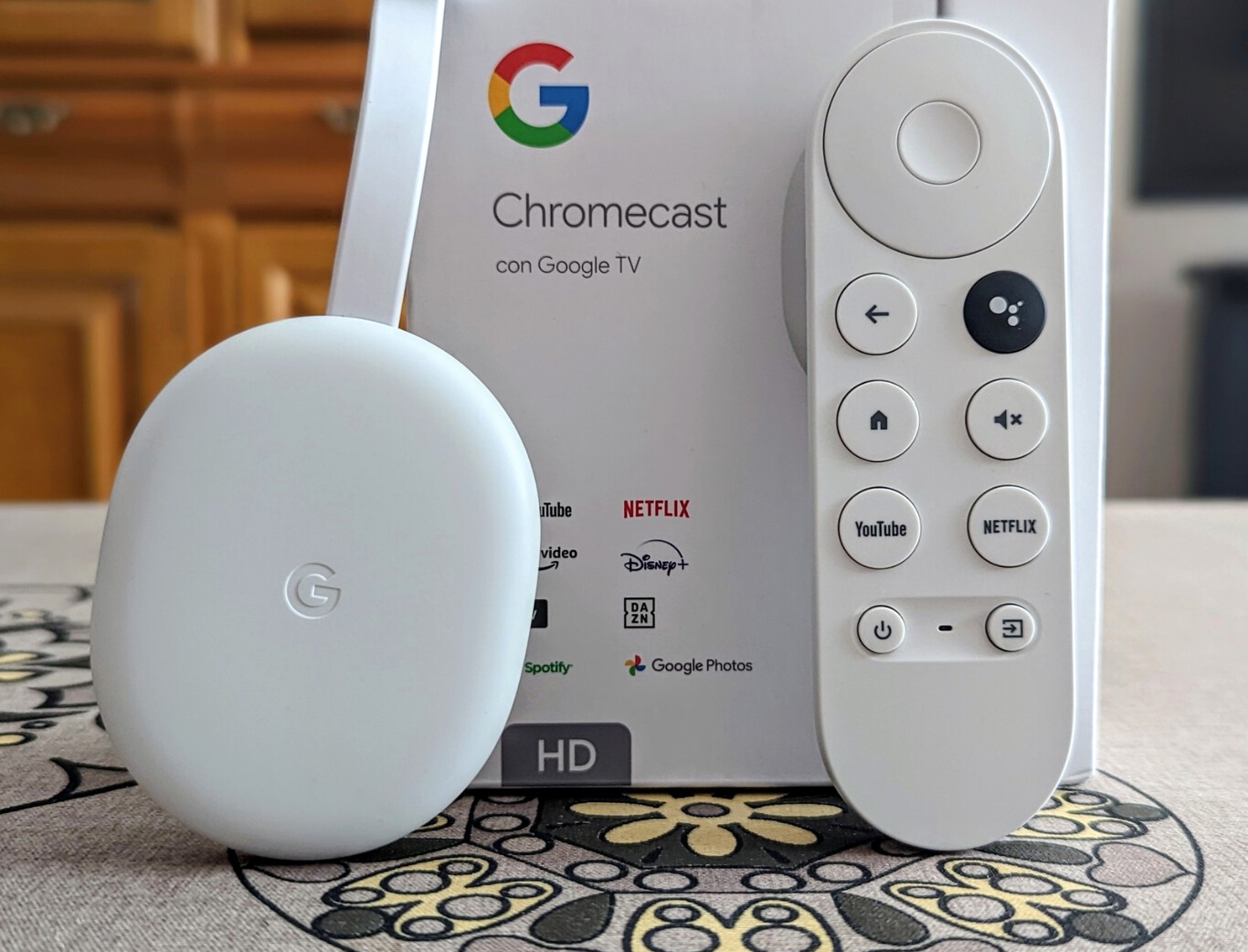
- Great for: Users who prefer Google’s interface and Android-based apps.
- Supports: 4K streaming, HDR, and seamless integration with Google Assistant.
- Hardware: Minimal design - just a small stick with no remote.
Google's Chromecast with Google TV is perfect for users who want a clean, simple experience with strong integration into their Android ecosystem.
NVIDIA Shield Streaming Stick

- Best for: Gamers or those wanting advanced media features.
- Supports: 4K streaming, HDR, and includes a controller.
- Use Case: Ideal for PC gaming or using it as a smart TV box.
The NVIDIA Shield is a standout for users who want to stream PC games or need more advanced media capabilities. It’s not for casual users but is top-tier for power users.
Apple TV 4K (2nd Gen)
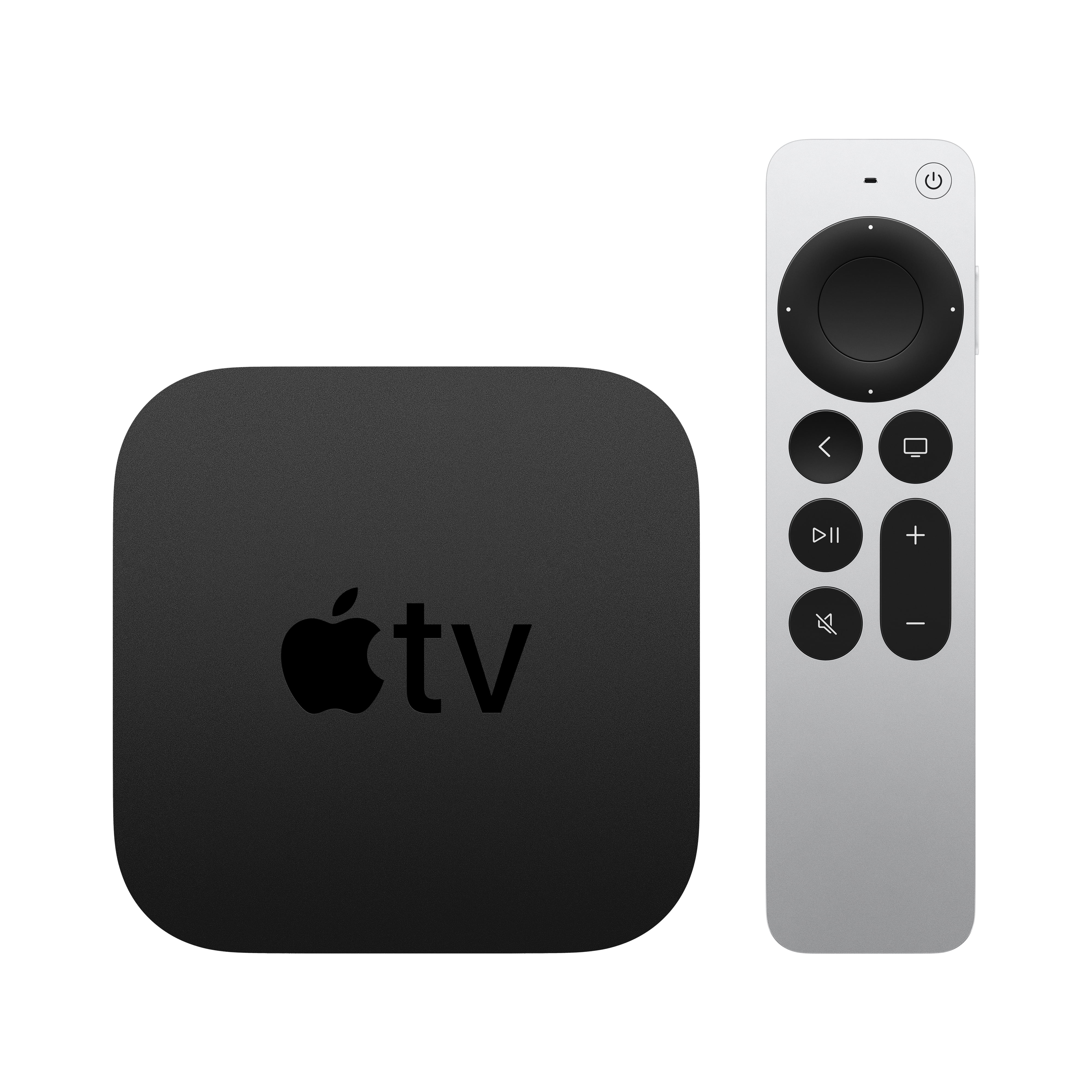
- Perfect for: Apple users wanting seamless integration with iOS devices.
- Supports: 4K HDR, Dolby Vision, and AirPlay 2.
- Design: Sleek but limited app availability compared to competitors.
Apple’s latest streaming stick is a solid choice for users already invested in the Apple ecosystem. It offers excellent picture quality and integration but lacks broad app support.
Streaming Sticks for IPTV: A Growing Trend
IPTV (Internet Protocol Television) is gaining traction as a way to access live TV without cable. Some streaming sticks are better suited for IPTV apps than others due to app compatibility and performance.
Budget-friendly models like the Amazon Fire TV Stick often work best with IPTV because of their stable performance and wide range of supported apps.
Best Streaming Sticks for IPTV in 2026
- Amazon Fire TV Stick 4K Max: Works well with most IPTV apps.
- Roku Streaming Stick+: Offers stable performance and wide app support.
- Google Chromecast with Google TV: Good for users who prefer Android-based IPTV apps.
These models are reliable choices for IPTV enthusiasts, especially when paired with a good IPTV service provider.
Budget Streaming Sticks: Value Without Compromise?
Budget streaming sticks have become more capable in recent years, but they often lack advanced features. They’re ideal for basic users who only want to stream Netflix or YouTube.
Higher-end models offer better performance and app support, making them a better long-term investment.
Top Budget Streaming Sticks
- Amazon Fire TV Stick Lite: Affordable, basic streaming with good app support.
- Roku Express+: Simple, reliable, and budget-friendly.
- Google Nest Hub (2nd Gen): Not a stick but includes streaming capabilities.
These sticks are perfect for those who don’t want to spend much and still enjoy quality streaming.
4K Streaming Sticks: Is the Upgrade Worth It?
a guide to 4K streaming boxes for Ultra HD TVs are now mainstream, offering better picture quality than older models. Not all TVs support 4K, so it’s important to check compatibility before purchasing.
Higher-end 4K sticks offer HDR, Dolby Vision, and faster processing for a smoother experience.
Key Features to Look for in a 4K Streaming Stick
- HDR Support: HDR10+, Dolby Vision, or HDR Vivid for better contrast.
- Processing Speed: At least 1.5GB RAM for smooth streaming.
- Wi-Fi 6 Support: Faster internet speeds and better connectivity.
- Voice Assistant Integration: For hands-free control and search.
Performance and Features Comparison
Streaming sticks vary significantly in performance, especially when handling 4K content. App availability and interface design impact user experience. Voice assistant integration is becoming a standard feature.
Build Quality: Does it Survive a Drop?
Most streaming sticks are compact and lightweight, but durability varies. Some models come with protective cases or are designed to be more robust. A sturdy stick can save you from costly replacements if it’s accidentally knocked off the TV.
App Ecosystem: What’s Available?
Roku has the largest app library, followed by Amazon Fire TV and Google TV. Apple TV lags behind but offers a curated experience.
Voice Assistant Integration
- Amazon Fire TV Stick: Includes Alexa.
- Google Chromecast: Integrates with Google Assistant.
- Roku & Apple TV: Limited voice assistant support.
Voice control is increasingly common and convenient, especially for users who prefer hands-free navigation.
Who Should Buy Which Streaming Stick?
Choosing the right streaming stick depends on your tech ecosystem, budget, and usage habits:
Best Overall: Roku Ultra 4K or Amazon Fire TV Stick 4K Max
For the best overall experience, go with either of these two models. They offer top-tier performance, features, and app support.
Budget Buyers: Roku Express+ or Amazon Fire TV Stick Lite
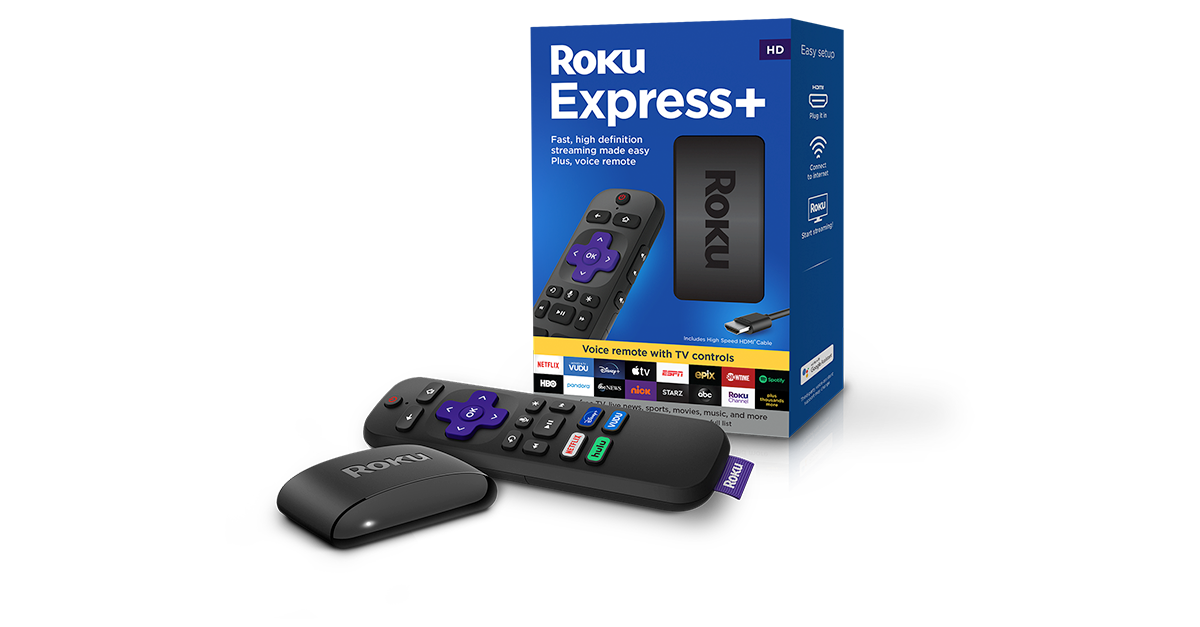
Budget-conscious users should consider these affordable options for basic streaming needs.
Gamers: NVIDIA Shield Streaming Stick
Gamers or PC users may prefer the NVIDIA Shield for its advanced media features and controller support.
Apple Users: Apple TV 4K (2nd Gen)
Apple users should opt for Apple TV 4K (2nd Gen) for seamless integration with iOS devices.
Who Should Skip?
- Users who don’t stream often or only watch local channels may not need a streaming stick.
- Those who already have a smart TV with built-in streaming capabilities.
- People who prefer traditional cable or satellite TV.
Alternative Devices to Consider
Smart TVs with built-in streaming apps are an alternative for those not wanting a stick. Streaming boxes like the NVIDIA Shield or Apple TV offer more features but at higher prices.
Roku Ultra and Amazon Fire TV Stick 4K Max are solid choices for users seeking premium performance.
Frequently Asked Questions
What is the best streaming stick for 4K?
The Roku Ultra 4K Streaming Stick and Amazon Fire TV Stick 4K Max are among the top performers in 4K streaming. Both offer HDR support, fast processing, and robust app libraries.
Do streaming sticks work with any TV?
Yes, most streaming sticks are compatible with TVs that have an HDMI port. They work best on modern TVs with built-in smart features or those that support streaming apps.
Are budget streaming sticks worth it?
Budget streaming sticks are great for users who only watch basic content like Netflix or YouTube. For more advanced features, a mid-range stick is recommended.
Can I use a streaming stick for IPTV?
Yes, most modern streaming sticks support IPTV apps. The Amazon Fire TV Stick 4K Max and Roku Streaming Stick+ are especially good choices for IPTV users.
How do I set up a streaming stick?
Setting up a streaming stick is straightforward. Simply plug it into your TV’s HDMI port, connect to power, and follow the on-screen setup instructions to connect to your Wi-Fi network.
Final Verdict: Are Streaming Sticks Worth the Hype in 2026?
Yes, streaming sticks remain a valuable and flexible way to access entertainment. The right choice depends on your budget, tech ecosystem, and usage needs.
Investing in a higher-end stick like Roku Ultra or Amazon Fire TV Stick 4K Max is recommended for the best experience. These models offer superior performance, app support, and features that make them worth the investment.
Final Rating: ⭐⭐⭐⭐☆ (4.5/5)