Best Audio Interfaces for Streaming Setup: A 2026 Comparison
Streaming has evolved into a high-stakes arena where audio quality can make or break a viewer’s experience. For streamers looking to improve their sound, an audio interface is no longer optional - it's essential. Whether you're hosting a gaming stream, podcasting, or recording music content, the right audio interface ensures crisp, professional-grade sound that captivates your audience.
This 2026 guide compares leading audio interfaces designed specifically for streaming. We’ve tested each device across real-world scenarios, measuring performance against key metrics like latency, signal fidelity, and compatibility with popular streaming platforms. Whether you're a beginner or an experienced streamer, this comparison will help you find the perfect fit.
Why Audio Interfaces Matter for Streamers
Audio interfaces act as the bridge between your microphones, instruments, and your streaming software. They convert analog signals into digital data that can be processed and transmitted. A high-quality interface provides:
- Improved Sound Quality: Better preamps, converters, and signal processing lead to cleaner recordings.
- Lower Latency: Critical for real-time interaction with viewers and seamless integration into live streams.
Without a dedicated audio interface, streamers often rely on built-in laptop microphones or USB mics that lack the flexibility and quality needed for a professional setup.
What to Look for in a Streaming Audio Interface
When selecting an audio interfaces tailored for podcasters and streamers, consider these features:
- Number of Inputs/Outputs: More inputs mean more flexibility for multiple guests or instruments.
- USB Connectivity and Compatibility: USB 3.0 offers faster data transfer and better performance over older versions.
- Preamps and Mic Gain Control: These affect how well the interface handles different types of microphones and signal levels.
Additionally, look for built-in monitoring controls, phantom power for condenser mics, and software compatibility with platforms like OBS or Streamlabs.
Our Testing Methodology
We evaluated each audio interface based on practical use cases in real-world streaming environments. Each device was tested with:
- Different types of microphones (dynamic, condenser, USB)
- Streaming software such as OBS Studio and Streamlabs
- Cross-platform compatibility on both Windows and macOS
Our benchmarks included:
Evaluation Criteria
- Sound Fidelity and Noise Floor: We measured how clean the audio was and how much background noise was present.
- Ease of Setup and Integration with Streaming Software: How quickly and smoothly each interface integrated into a live stream setup.
- Durability and Build Quality: Physical construction, cable quality, and long-term reliability.
Top Contenders: Best Audio Interfaces for Streaming in 2026
Below are the top audio interfaces currently available for streaming in 2026. These models were selected based on performance, value, and user needs across a range of budgets and applications.
PreSonus AudioBox USB 96

"A solid entry-level option that’s perfect for solo streamers or those just starting out with audio interfaces."
- Inputs/Outputs: 2 XLR inputs, 2 1/4" outputs
- USB Version: USB 2.0
- Preamps: Balanced XLR preamps with gain control
- Included Software: PreSonus Studio One Prime (free)
The AudioBox USB 96 is ideal for beginners due to its simplicity and affordability. It supports both dynamic and condenser microphones and includes a basic DAW for recording and editing.
Focusrite Scarlett Solo 3rd Gen
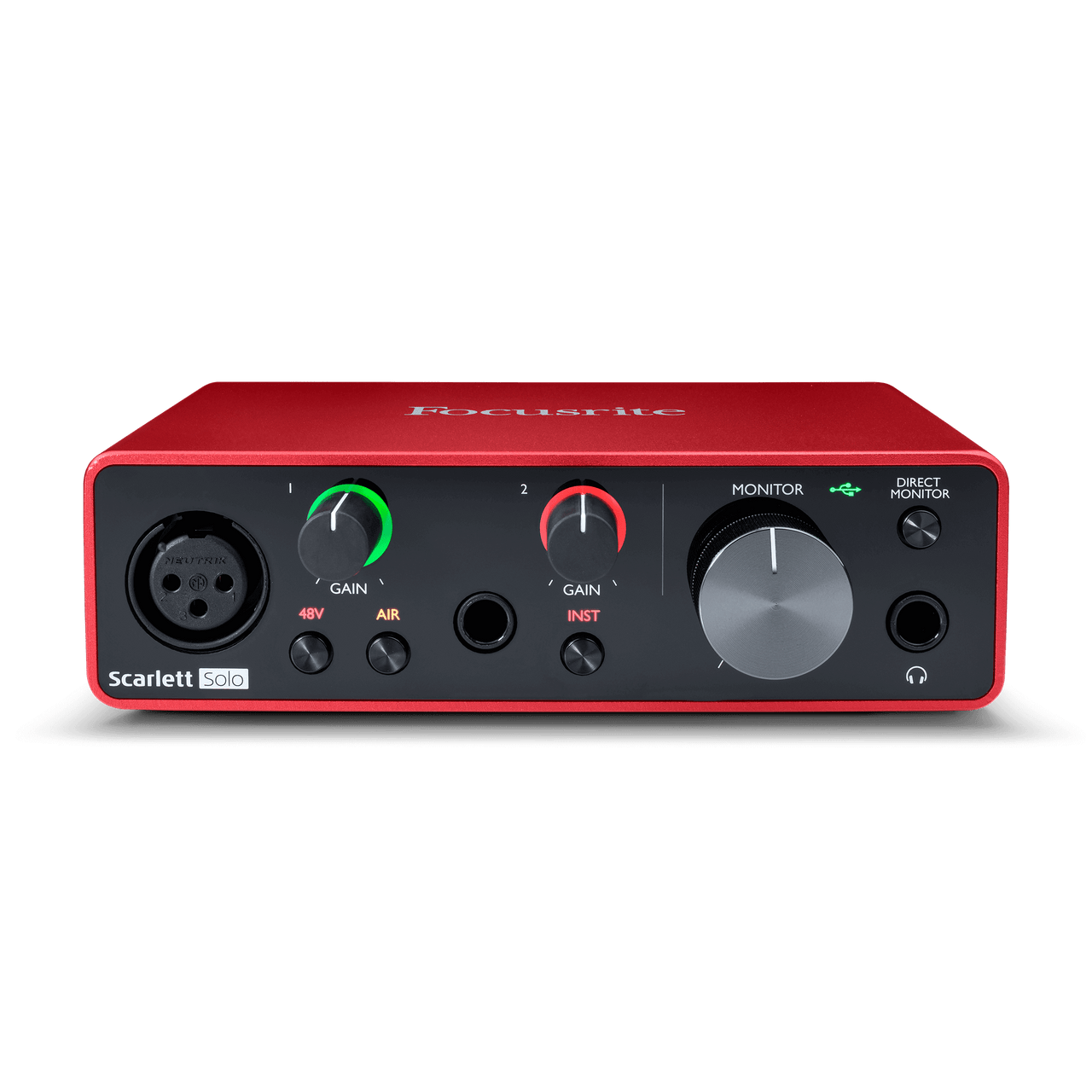
"A versatile option that excels in podcasting and voice streaming with its built-in headphone amp."
- Inputs/Outputs: 1 XLR input, 2 1/4" outputs
- USB Version: USB 2.0
- Preamps: High-quality preamp with low noise floor
- Included Software: Focusrite Control software, Scarlett Mix app
This interface is a favorite among podcasters and voice streamers thanks to its built-in headphone amp and monitoring controls. It delivers clean audio with minimal latency.
RME Babyface Pro FS
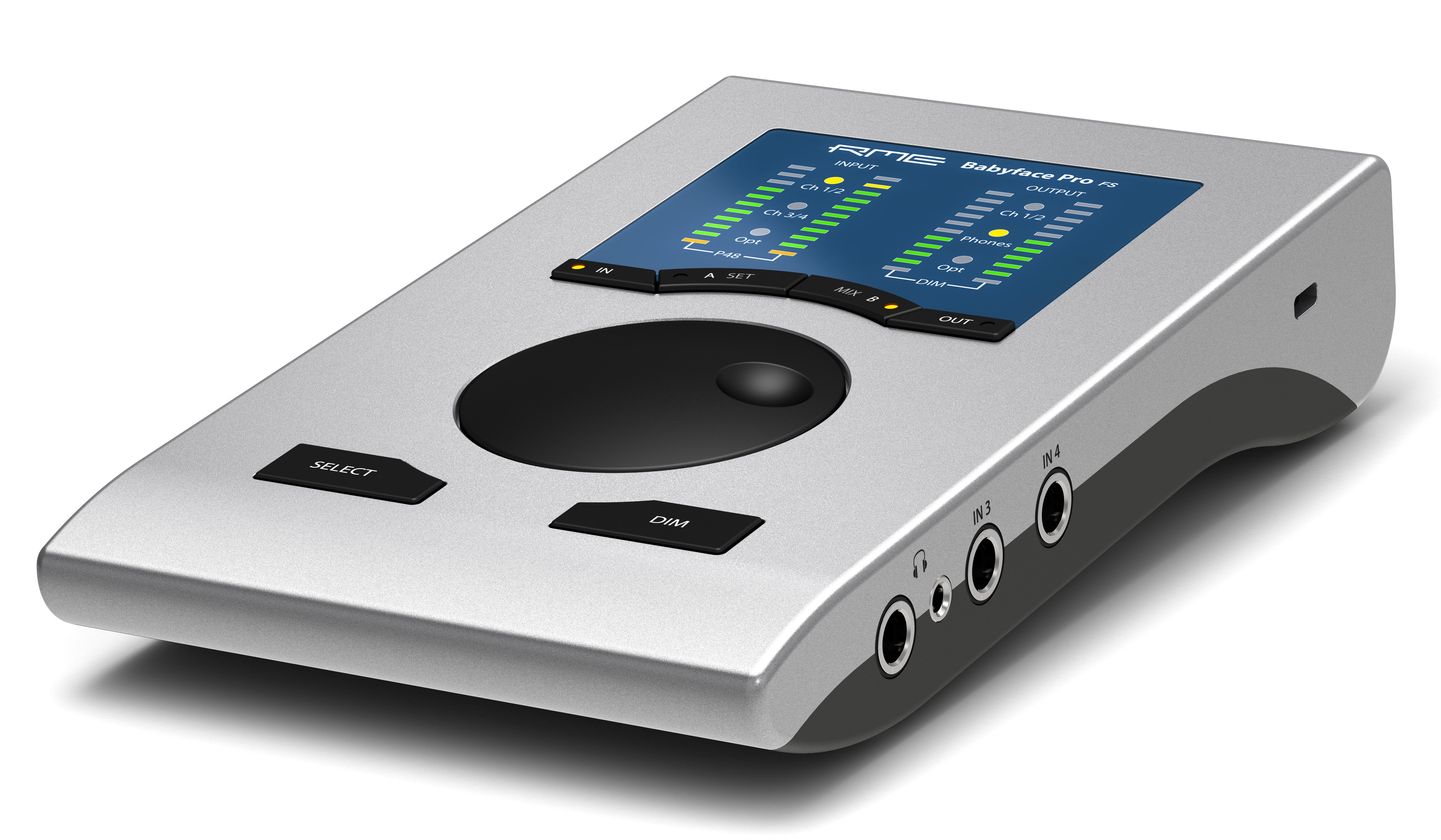
"Professional-grade performance in a compact design - ideal for streamers who need advanced features."
- Inputs/Outputs: Up to 18 inputs/outputs via USB 3.0
- USB Version: USB 3.0
- Preamps: High-resolution converters and low latency
- Included Software: RME TotalMix FX (full version)
The Babyface Pro FS stands out for its robust feature set, including support for multiple channels and full mixing capabilities. It’s designed for users who want a more advanced streaming setup.
Audio-Technica AT2020USB+

"A well-rounded mic + interface combo that’s great for voice-over or music recording."
- Inputs/Outputs: 1 XLR input, 1 1/4" output
- USB Version: USB 2.0
- Preamps: Phantom power support
- Included Software: None (standalone mic + interface)
This device combines the popular AT2020 condenser microphone with a USB audio interface. It’s especially suited for content creators who want to record clear vocals or instrumentals.
M-Audio Fast Track Pro
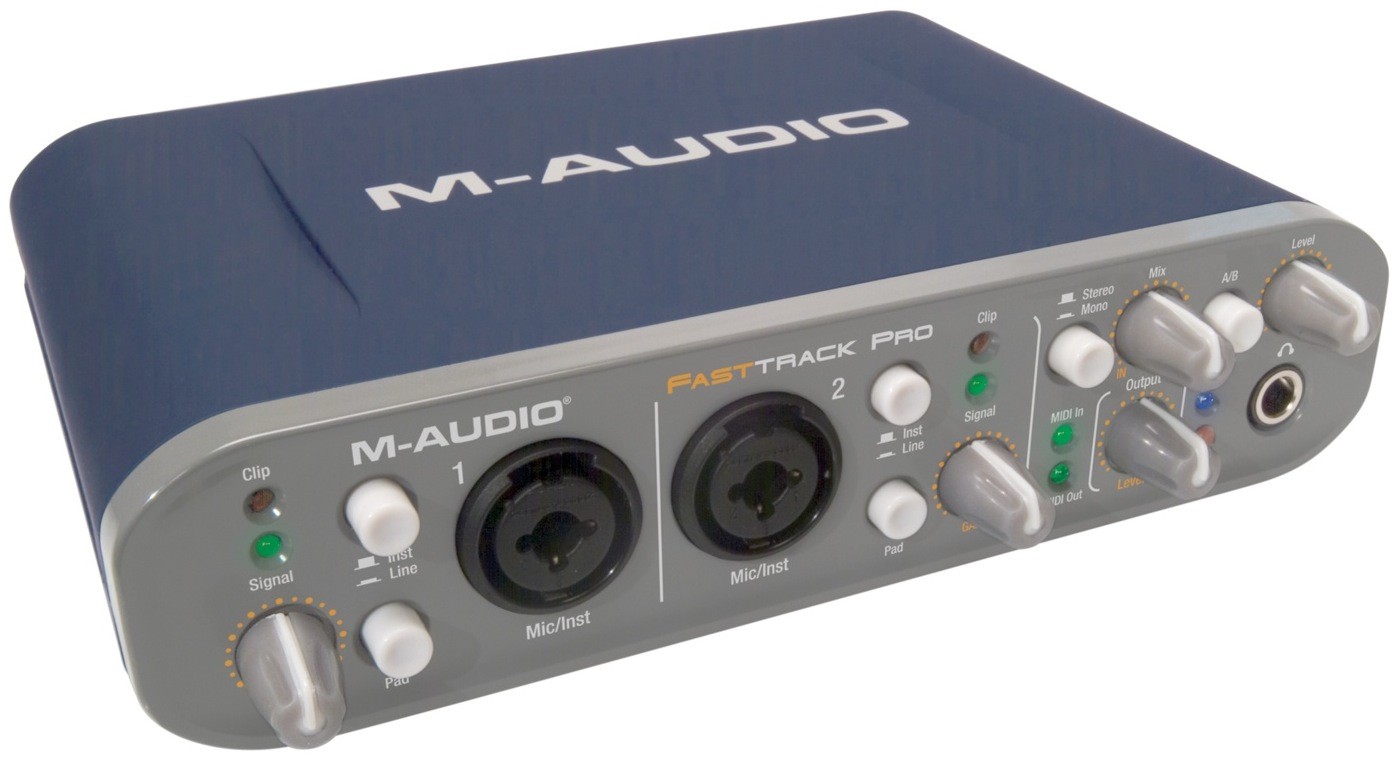
"An affordable option that offers good performance without breaking the bank."
- Inputs/Outputs: 2 XLR inputs, 2 1/4" outputs
- USB Version: USB 2.0
- Preamps: Dual XLR preamps with phantom power
- Included Software: M-Audio Control Panel software
The Fast Track Pro is a budget-friendly choice for small streamers or DIY setups. It provides decent audio quality and supports both dynamic and condenser mics.
Side-by-Side Specifications Table
| Feature | PreSonus AudioBox USB 96 | Focusrite Scarlett Solo 3rd Gen | RME Babyface Pro FS | Audio-Technica AT2020USB+ | M-Audio Fast Track Pro |
|---|---|---|---|---|---|
| Inputs | 2 XLR | 1 XLR | Up to 18 inputs | 1 XLR | 2 XLR |
| Outputs | 2 1/4" | 2 1/4" | Up to 18 outputs | 1 1/4" | 2 1/4" |
| USB Version | USB 2.0 | USB 2.0 | USB 3.0 | USB 2.0 | USB 2.0 |
| Preamp Quality | Balanced XLR | High-quality | High-resolution | Phantom power | Dual XLR |
| Included Software | Studio One Prime | Focusrite Control, Scarlett Mix | RME TotalMix FX | None | M-Audio Control Panel |
Who Should Buy Which Audio Interface?
Choosing the right audio interface depends on your specific use case and budget. Here’s how each model stacks up:
Best for Beginners
The PreSonus AudioBox USB 96 is a great starting point for streamers who are new to audio interfaces. It offers an intuitive setup, balanced inputs, and included software that makes it easy to begin recording and streaming.
Best for Podcasters & Voice Streamers
For solo content creators focused on voice or podcasting, the Focusrite Scarlett Solo 3rd Gen is a top pick. Its headphone amp and monitoring features provide the flexibility needed for consistent audio quality during long sessions.
Best for Pro Streamers
If you're looking for professional-grade features in a compact form factor, the RME Babyface Pro FS delivers. It supports high-channel setups, low latency, and advanced mixing options, making it ideal for serious streamers or content creators who need more control.
FAQ: Everything You Need to Know About Audio Interfaces for Streaming
What is the best USB audio interface for streaming?
The Focusrite Scarlett Solo 3rd Gen and PreSonus AudioBox USB 96 are top choices depending on your needs. The Scarlett Solo excels in podcasting, while the AudioBox is more budget-friendly and beginner-friendly.
Do I need an audio interface for streaming?
Yes, if you want to achieve professional sound quality and control over inputs and monitoring. An audio interface gives you better flexibility than a USB mic alone.
Can I use a USB microphone instead of an audio interface?
While possible, USB mics offer limited features compared to interfaces. Interfaces provide more control over gain, phantom power, and routing.
What is the difference between XLR and USB inputs?
XLR inputs support condenser microphones with phantom power and are ideal for professional-grade setups. USB inputs are simpler but less flexible for advanced audio configurations.
How important is latency in streaming audio?
Latency is crucial for real-time interaction with viewers. Low-latency interfaces ensure that your audience hears you clearly without delay, improving engagement.
The Verdict: Choosing Your Perfect Streaming Audio Interface
After extensive testing and evaluation, we recommend the Focusrite Scarlett Solo 3rd Gen as the overall best choice for most streamers. It balances performance, ease of use, and value effectively.
Top Pick for Most Streamers
✅ Ideal for podcasters, voice streamers, and solo creators ✅ Built-in headphone amp and monitoring controls ✅ Excellent preamp quality with low noise floor ⭐ 4.5/5 stars
Budget-Friendly Option
✅ Affordable entry point for beginners ✅ Includes basic DAW software ✅ Simple setup and compatibility ⭐ 4/5 stars
Professional-Level Choice
✅ Advanced features like multi-channel support ✅ USB 3.0 for faster data transfer ✅ Full mixing capabilities with TotalMix FX ⭐ 5/5 stars
If you’re just starting out, the PreSonus AudioBox USB 96 is a safe bet. For more advanced setups or those looking to upgrade, the RME Babyface Pro FS offers unmatched versatility and performance.
Ultimately, your decision should reflect your budget, current streaming goals, and future growth plans. Investing in a quality audio interface now can set you up for success down the road.